The Preview Bar displays thumbnails of recently viewed studies for quick access to them and for comparing studies
When you launch the program, the preview pane will display studies from the previous working session The full list of studies is located in the
Archive Note: When the Archive window is open, clicking on a study title in the Preview Bar will indicate its location in the Archive
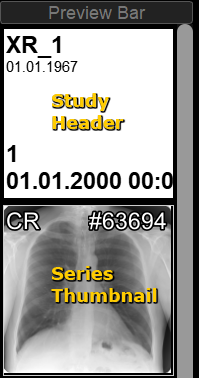
A study in the Preview Bar is represented by a header with brief patient and study information and thumbnails of the series/images of that study
To the right of the Preview Bar is the Preview Bar scroll bar
All inactive (not displayed on screen) studies hide image thumbnails (collapsed) and are presented only by the header
To view image thumbnails, left-click the header of a collapsed study in the Preview Bar
To collapse a study in the Preview Bar, left-click the header of an expanded study in the Preview Bar
Scroll Through Studies in the Preview Bar
Hover the mouse cursor over the Preview Bar scroll bar slider
Press and hold the left mouse button
While moving the mouse, drag the slider up or down the scroll bar
Release the mouse button
Remove (hide) a Study from the Preview Bar
To hide a study from the Preview Bar while keeping it in the Archive
Right-click the study header
In the menu that appears, select the Unload from Preview Bar item
The study will be removed from the Preview Bar
Clear the Preview Bar
Intended for unloading studies from the Preview Bar
Studies are not deleted; they are stored in the Archive
Right-click the Preview Bar header
Left-click the "Clear Preview Bar" item
Or use the corresponding menu item: Studies - Clear Preview Bar
Managing Studies and Series from the Preview Bar
Hover the mouse over the study header or series/image thumbnail in the Preview Bar
Left-click the "More" button
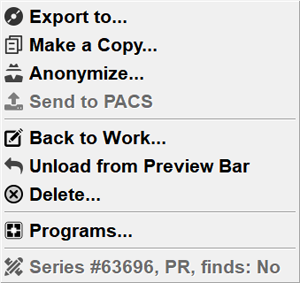
A menu will appear:
Studies
Left-click the desired item
If necessary, in the window that appears, confirm your actions by clicking the OK button
Unload from Preview Bar - removes the study from the Preview Bar, while keeping it in the archive
Delete study - completely deletes the study from the program
Programs - launching special modality-specific programs
Series/Image Thumbnails
Left-click the desired item
If necessary, in the appeared window, confirm your actions by clicking the OK button
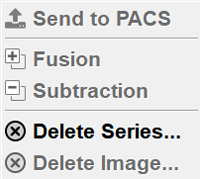
Send to PACS - sends the selected series
Delete series... - completely deletes the series from the application
Delete image - completely deletes the active (on-screen) image from the application
Notes:
If there is only one image in the series, or only the entire series can be deleted, the "Delete image..." item is not displayed
Also, the series menu may contain items for selecting Image Fusion/Subtraction
Information of Study/Series/Image Thumbnails in the Preview Bar
The study header in the Preview Bar displays the following information:
 the Preview Bar header
 the "Clear Preview Bar" item
 button