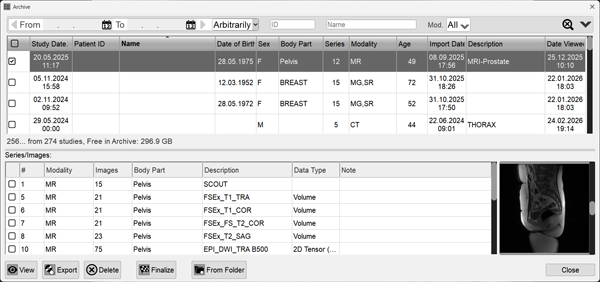
The window displays a list of all studies in the Archive, their count, and the remaining free space on the disk with images Note: With the Archive window open, clicking on a study title in the Preview Bar will indicate its location in the Archive
Sorting Studies
Click on a column header to sort by that parameter
Click on the column header again to change the sort direction
Searching for a Study
The search panel is located at the top of the Archive
Numeric and text fields are filled in the usual way
To open additional search fields, click the button
To clear all search fields, click the button
By Date
Manual Entry
Enter numbers in the fields with dots (day.month.year)
Clicking on a date field opens the calendar
Click sequentially to select the month, year, and day
The forward/back arrows scroll within the set range
Selecting a Date Range
1 Day - the current date
2 Days - the previous and current date
Week - one week back from the current date
Month - one month back from the current date
Arbitrary - resets the range parameters and allows manual entry
Additional Filters
They work both independently and within the selected date range
Patient ID, Patient Name (Last Name, First Name), and Body Part are entered manually
Clicking on the Modalities field opens the modalities list
Click on the desired one in the list that appears
Multiple modalities can be selected
Saving Search Parameters
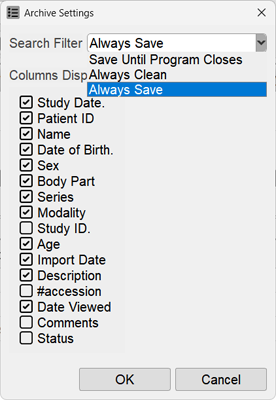
To configure and save search parameters, click the button and select the required option by clicking on it in the window that appears
You can also specify which columns appear in the Archive window by clicking next to the headings
Updating Study Format
Updating the study format is necessary if the program has been updated to a new version
It occurs automatically for studies opened from the Archive
To update the format of all studies in the Archive, click the button
It may take quite a long time (depending on the Archive volume and hard drive performance)
Selecting Multiple Studies/Series
To select multiple studies/series, use the following guide
Study Content: Series and Images
When a single study is selected, its series/images will be shown in the Series/Images table in the lower half of the window
To select a part of the study, check the boxes in the first column for the needed series/images, as shown above
Series and Images Preview Window
To the right of the series and images table, there is a preview window
Use the scroll bar to browse through the images and pre-select the ones you want
Double-clicking the left mouse button in the preview window will display the corresponding series/image on the screen
Actions on Selected Studies or Parts of a Study
After selecting the desired studies or series/image, press the action button at the bottom of the window
 or
or


 button
 button
 button and select the required option by clicking on it in the window that appears
 button