go to Vidar Dicom Viewer page
Exporting a Study to Hard Drive
Click the
Export…
button
in the
toolbar
,
or
Press the keys:
+
Click the button with the
computer image
in the window that appears
In the Windows Explorer window select a folder to export the study to
Click the
Select Folder
button
The export window will close
The arrow on the export button will blink
You can continue working with the program during the export
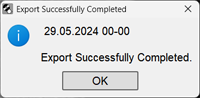
After the export is complete, a message will appear:
Open Windows Explorer and you will see a folder named with the patient's last name and initials
If errors occurred during the export, the program will report them
See also
Exporting a Study to CD/DVD
Exporting a Study to USB Drive
Exporting Multiple Studies
Exporting Part of a Study
Exporting a Study Packed into a ZIP Archive
Study Anonymization
Additional Export Parameters
Vidar Dicom Viewer Help 3.0, © 2026
PO Vidar