go to Vidar Dicom Viewer page
Exporting Part of a Study
Perform the export
in the usual way
until the
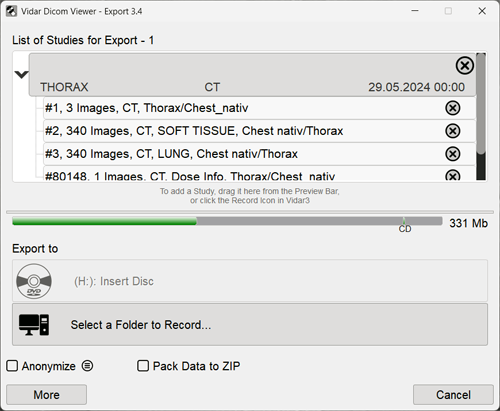
Study List for Export
appears
Click the arrow icon
next to the study in the list
All series (images) of this study will appear in the list:
Use the scroll bar to scroll through the list (if the list of images/series is not displayed completely)
To remove a series/image from the export list, click the cross
next to the corresponding item
Continue the export
in the usual way
See also
Exporting a Study to CD/DVD
Exporting a Study to USB Drives
Exporting a Study to Hard Drive
Exporting Multiple Studies
Exporting a Study Packed into a ZIP Archive
Study Anonymization
Additional Export Parameters, Canceling Export
Vidar Dicom Viewer Help 3.0, © 2026
PO Vidar
 next to the study in the list
 next to the corresponding item next to the study in the list
next to the corresponding item
next to the corresponding item next to the study in the list
next to the corresponding item