go to Vidar Dicom Viewer page
Additional Export Parameters, Canceling Export
Perform the export
in the usual way
until the
Study List for Export
appears
Click the "More" button
In the window that appears, click on
or
check/uncheck the required options:
To save the export settings for future use, click the button
During the export, click the "Show" button in the lower right corner of the program
A window will appear with a list of studies being exported, the target folder, and the export progress
Click the "Cancel Export" button to cancel, or the "Close" button to hide this window from the screen
See also
Exporting a Study to CD/DVD
Exporting a Study to USB Drives
Exporting a Study to Hard Drive
Exporting Multiple Studies
Exporting Part of a Study
Exporting a Study Packed into a ZIP Archive
Study Anonymization
Help on Launching the Disc for the Patient
Vidar Dicom Viewer Help 3.0, © 2026
PO Vidar
 or
or  check/uncheck the required options:
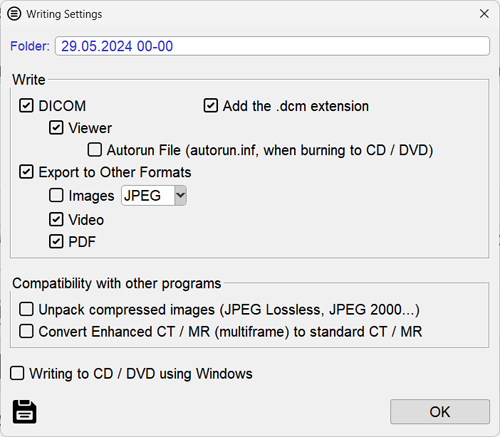
 or check/uncheck the required options: