Basic Video Functions
You can use video mode for viewing films or for
automatic image scrolling
Enable Video Mode
- If a series containing video is selected, playback starts automatically
- To force video playback, click on the toolbar:

or
-
Press the key
 on the keyboard
- A video control panel will appear:
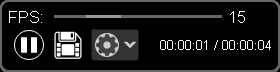
- The panel automatically hides after a short time
To call it back, simply move the mouse
Exit Video Mode
-
Click on the toolbar
 or press the key
on the keyboard again
or press the key
on the keyboard again
Video Panel
From left to right:
- Top - slider for controlling the frame change rate
- Play / Pause button
- Save button
- More... button
Saving a Video
-
Click on the video panel

- A window for selecting a save folder will open
- The file will be saved in *.avi format
- The file name will be automatically assigned based on the patient's last name, first name, and patronymic, as well as the date of the study
- Select a folder for saving
- Click the Save button
Video Settings Panel
The top part contains sliders for controlling video brightness, contrast, and saturation
Below them are buttons for additional functions
From left to right:
-
 Button Add video fragment
-
 Button Create video fragment
-
 Button Merge video fragments
See also
Vidar Dicom Viewer Help 3.0, © 2026
PO Vidar