Curved MPR (cMPR) is the construction of a set of surfaces along an arbitrary spatial curve
Constructing a Curved MPR
Click in the toolbar, "3D Navigation" group
on the button
OR
Press the key on the keyboard
Click the "General" tab
Click the button
The screen will be split into 4 frames.
Begin constructing the reference curve on one of the projections by left-clicking
Scroll through the images using the mouse wheel while continuing to draw the curve
Useful Tips
While constructing, you can scroll images with the mouse wheel
While constructing the curve, hide the 3D cursor and lines (key on the keyboard) to avoid interference
After construction, restore them to the screen using the same method
Enlarge the projection with the button in the active overlay for more precise construction, then reduce it to its original size with the button

If you switch to any tool in the Toolbar, the construction curve will hide
To make it reappear, press the button in the series header
The current result will be displayed in the lower right frame
Finish constructing the curve by double-clicking on the last point
Editing the Reference Curve of cMPR
Right-click:
Mouse cursor over a point - delete existing point
Mouse cursor over the curve - add new points on the curve
To add a point at the beginning or end of the curve, use the "More" item (see Measurement Manipulations)
Left-click:
Mouse cursor over a point - move points
Mouse cursor over the curve - move the entire curve
Note: Too sharp bends in the curve lead to the appearance of artifacts on the resulting surface
Manipulating Curved MPR
The 3D cursor synchronizes voxels on the resulting cMPR surface with orthographic projections
It can be used to scroll through orthographic projections
If the 3D cursor position matches the resulting cMPR, it is displayed on it
Measuring line segment lengths is available on the resulting cMPR
Segments perpendicular to the construction reference line (vertical) are measured accurately
"Segments" measured along the reference line (horizontal) will show the length of a curve parallel to the reference line
Other "segments" will measure distances on the reconstruction surface
The angle values are unreliable
Size values and statistics of planar areas are unreliable
Point density values are quite accurate
The lower right frame displays the resulting cMPR - the surface "along" the curve
To work with cross-sectional planes, switch to Extended Curved MPR Mode
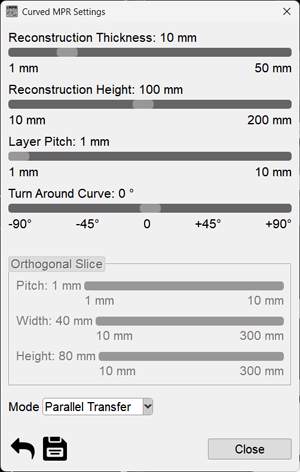
Basic Curved MPR Settings
Click the "cMPR" button in the upper left corner of the series
Select the Settings menu item and click on it
Set the necessary parameters using the sliders:
Reconstruction Thickness - the size of the construction zone in the plane of the construction curve
Reconstruction Height - the size of the construction zone perpendicular to the plane of the construction curve
Slice Step - the thickness of the reconstruction
Rotation Around Curve - rotation of the long axis around the reference curve