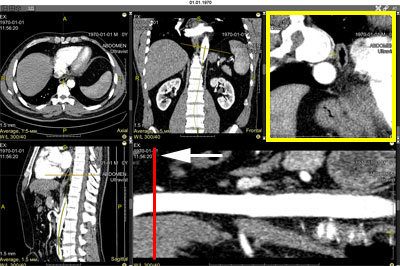
Displays, in addition to the resulting cMPR, orthogonal (cross-sectional) slices perpendicular to the construction curve
Allows setting additional reconstruction parameters
Extended Representation and Settings of cMPR
To show orthogonal slices, click the button in the cMPR series header
An orthogonal projection panel will be added to the screen
A red linear cursor for controlling orthogonal slice scrolling will appear on the cMPR
Moving (hover mouse cursor, press and hold left mouse button, move mouse) the linear cursor on the cMPR leads to synchronous scrolling of orthogonal slices
Scrolling orthogonal slices synchronously moves the linear cursor on the resulting cMPR
Orthogonal slices are planes; all measurements on them are reliable
Orthogonal Slice Settings Menu for cMPR
Pitch - thickness of the orthogonal slice
Width - width of the orthogonal slice
Height - height of the orthogonal slice
- Restore default settings
- Save settings
Returning to Standard cMPR Mode
To hide orthogonal slices, click the button in the cMPR series header
Exiting Curved MPR Mode
Click the "Exit Mode" item in the cMPR menu
The screen layout will return to standard one
 button in the cMPR series header
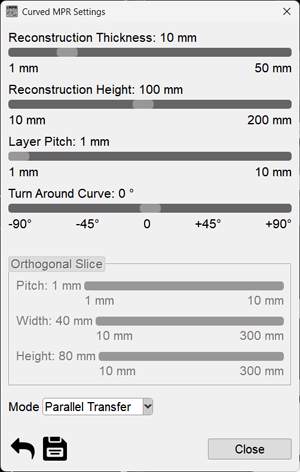
 - Restore default settings
 - Save settings
 button in the cMPR series header