 VDViewer
Vidar Dicom Viewer 3.4.3
Vidar Dicom Viewer version 3.4.3.1 has been released
The update includes:
New program:
Automatic spine labeling (button in the “Measurements” block, “Marks” group)
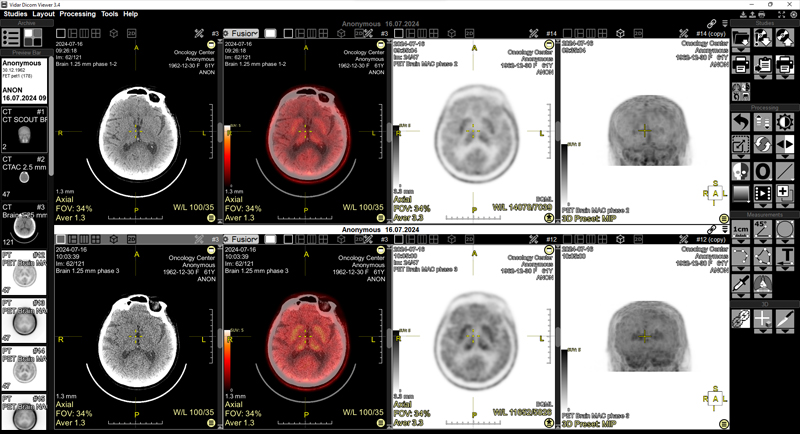
Global changes in the PET-CT program:
- With the appropriate program settings, PET-CT studies open immediately in a special layout
- In PET-CT mode, a choice of screen splitting by series has been added: 2x2 and 4x1
- For PET series, when changing the WL with the mouse, the lower window meaning is fixed at zero
- The SUV unit window is set to 0 to 5 by default
- SUV parameters are saved in the series state
- Default inversion settings have been added
- SUV calculation has been added to the Eyedropper tool
- Palette with numbers and presets for the SUV-bw scale
- Palette display has been added for 3D PET scans
- SUV calculation has been added in overlay mode. If the top layer is in the PET modality, the numbers on the scale are specified in SUV-bw units
- The SUV-bw calculation formula has been corrected
Improvements:
- Added the ability to attach PDF files when creating a new study
- Added the ability to drag and drop zip files from the Explorer window to the Archive window
Interface Improvements:
- The Ctrl+F11 key combination hides/shows the entire overlay on the screen
- In the series header and the finds list, the “Hide finds” button hides/shows finds
- Copying 3D spheres to other series with subsequent synchronization of these spheres
- In 3D mode, when the Scroll function is selected, rotate around the Z axis
- Clicking the mouse on the image while holding down the CTRL key moves the 3D cursor to the mouse cursor’s location
- Some measurements (Line, Oval, Rectangle, Circle, and 3D Sphere) can now be plotted not only with two clicks, but also with a single click. And in one click + drag and drop (set in settings)
- In the ROI text, the term “Avg” has been changed to the more commonly used “Mean”
- When calculating contrast washout, the help window text has been changed to “portal (venous)”
Fixed:
- Receiving and processing JPEG2000Lossless files
- Processing SR data
- Loss of CT presets when installing program or deleting the program configuration file
- Fixed changing of rectangle vertex coordinates when loading from Finds
- Incorrect series were offered when Fusion was present on the screen
- Incorrect partitioning of the tomosynthesis series from the Siemens station
- Incorrect partitioning of the MRI diffusion series from the Anke station