Manufacturing of medical devices and surgical instruments
Custom-made impressions, prosthetics, and implants
3D digital dentistry and pharmaceutical manufacturing
Vidar Dicom Viewer allows you to save a 3D model in STL format for subsequent 3D printing
An STL file stores information about your 3D model
The name STL is an abbreviation for stereolithography — a popular 3D printing technology
The primary file types used by 3D printers are STL and G-Code files
Click the "Advanced" button in the lower right corner
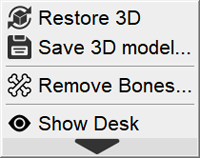
Click on the "Save 3D model" item
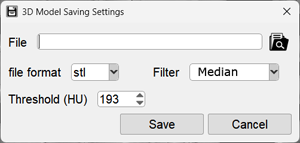
The preset will automatically change to "Closed Surface", which is required for printing, and a window will appear:
In the window that appears:
Specify a file name (arbitrary)
Specify the save location by clicking the button
Click the down arrow to select STL (default) or PLY (also known as Polygon File Format)
PLY files are usually smaller than STL, but PLY is less common
If necessary, adjust the filter and threshold value
To suppress noise in 3D, it is recommended to use a median or smoothing filter
"Grain" in 3D can also be removed by increasing the threshold value
The less noise, the smaller the STL file size and the more suitable it is for 3D printing
Additional processing is always available in specialized 3D printing software
Click the "Save" button - the model will be saved in the location you specified
 button and adjust the brightness/contrast if necessary
 button