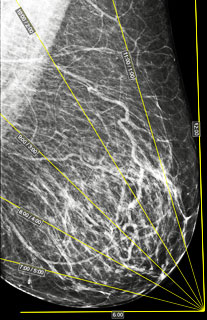
The tool allows marking the breasts by clock-face sectors
Located in the X-Ray button group within the Measurements toolbar
Construction in the Application
Click in the toolbar, X-Ray button group, on the button "Mammogram Sectors"
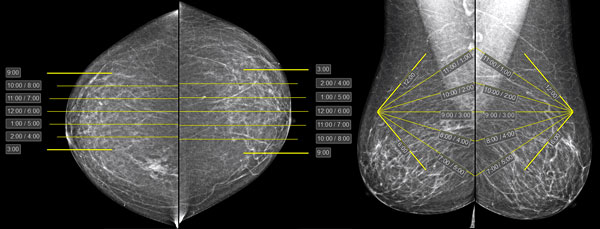
Clock-face sector markings will appear on the mammograms; they need to be adjusted to the specific study:
Correcting Markup on Frontal Projections:
Move the mouse to the center line
Hold down the left mouse button, move the mouse until the line matches the nipple, release the button
Move the mouse cursor to the top line (9 or 3 o'clock, depending on projection), hold down the left mouse button, and move the mouse to indicate the upper (on the image) edge of the breast
Move the mouse cursor to the bottom line (9 or 3 o'clock, depending on projection), hold down the left mouse button, and move the mouse to indicate the lower (on the image) edge of the breast
Correcting Markup on Oblique Projections:
Move the mouse cursor to the point located at the top of the corner (the front point of the nipple line)
Press and hold the left mouse button, move the mouse until the point aligns with the projection of the nipple, release the button
Repeat for the posterior point of the nipple line at the base of the breast
Move the mouse cursor to the top (12 o'clock) or bottom (6 o'clock) point
Press and hold the left mouse button, move the mouse until the boundaries of the extreme (12 and 6 o'clock) sectors coincide with the breast boundaries, release the button
If it's necessary to move the entire markup up or down; closer or farther from the image - similar actions, not on points, but on the sides of the angle
 "Mammogram Sectors"