go to Vidar Dicom Viewer page
Importing Multiple Studies
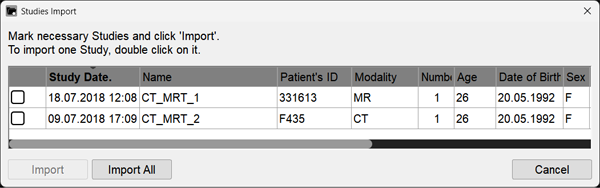
If there are multiple studies on the source (CD, DVD, USB, hard drive), a selection window will appear:
Click the "Import All" button to import all studies
Click the checkboxes
next to the studies you want, and then click the "Import" button to import individual studies
Click the "Cancel" button to cancel the import
The further behavior of the program is similar to that described in the previous sections:
Importing Images from CD/DVD Discs
Importing Images from USB, Hard Drives, ZIP Files
See also
Importing Studies from CD/DVD Discs
Importing Studies from USB, Hard Drives, ZIP Files
Importing Studies from PACS
Vidar Dicom Viewer Help 3.0, © 2026
PO Vidar
 next to the studies you want, and then click the "Import" button to import individual studies