go to Vidar Dicom Viewer page
ASPECTS Program
The ASPECTS (Alberta Stroke Program Early CT Score) scale
is used to assess early changes in cerebral stroke on non-contrast CT images
Website
The scale is only relevant for the middle cerebral artery (MCA) basin
Healthy person - 10 points
Each affected basin of the MCA blood supply corresponds to 1 point
Involvement of the entire MCA basin - 0 points
Practical Application:
within the first 3 hours of stroke, ASPECTS scores inversely correlate with severity on the NIHSS scale
7 points or less - predicts poor functional outcome and risk of intracerebral hemorrhage
8 points or less - thrombolysis is not effective
To indicate the ischemic area, all slices at the following levels are required:
Basal ganglia
Rostral structures
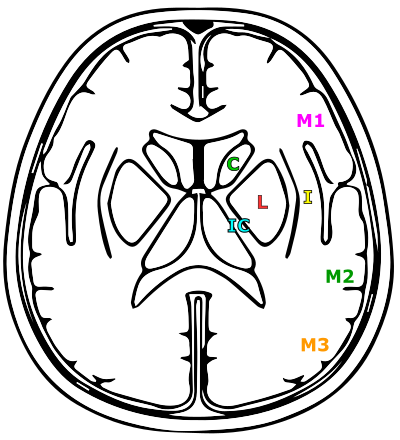
M1 - M3 are assessed at the level of the basal ganglia
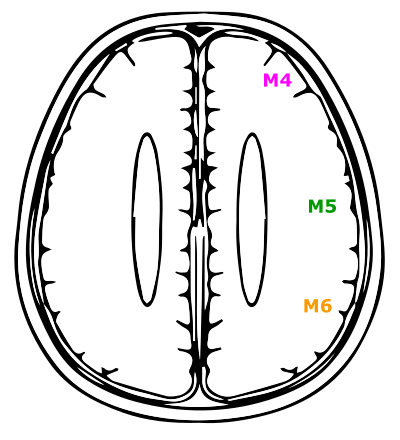
M4 - M6 are assessed at the ventricular level just above the previous level
Pathological changes must be visible on at least two consecutive sections
Launching the "ASPECTS" Program
Click on the "Programs" button
in the
Tool Panel
, "Studies" group
Click on the "ASPECTS" button
The screen will split into 2 panels:
Axial scans
Control panel
Note:
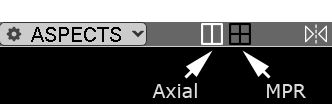
The program header contains a toggle switch
for MPR display
Three standard MPR display panels and a control panel will appear
Controlling the Reflection Line Position
The reflection line must precisely align with the interhemispheric fissure
Hide the 3D lines with the
keyboard key
Hover the cursor over the end of the reflection line
Hold down the left mouse button and move it
Repeat the operation for the opposite end
After setting the reflection line, you can hide/show it by clicking the
button in the program header again
Turn the 3D lines display back on with the
keyboard key, if necessary
Control Panel
MCA Territory Region Buttons
C (Caudate) - caudate nucleus
I (Insula) - insula
IC - (Internal Capsule) - internal capsule
L- (Lentiformis) - lentiform nucleus
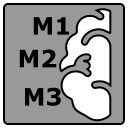
M1 - anterior MCA territory
M2 - lateral MCA territory
M3 - posterior MCA territory
M4, M5, M6 - anterior, lateral, and posterior MCA territories superior to M1, M2, and M3 territories
Markup Tool
Located below the MCA territory region buttons
Click the down arrow
Click on the tool name
Sequence of Actions
Click the button with the abbreviation of the MCA territory region affected by ischemia
Outline the ischemic zone on the axial scan
Scroll through the images with the wheel, outlining the zone on at least 2 adjacent scans
Repeat the above steps for all territories with identified ischemic zones
The result in points changes dynamically
Note:
The score depends only on the number of territories affected
With one button you can select an infinite number of areas without affecting the result
Saving Results
Saving in Vidar Dicom Viewer
The ASPECTS program is saved automatically upon exit
To display it, click on the "ASPECTS" item in the Finds list in the
Preview Bar
Saving the Result to the Study Report
Click the "Copy" button
to copy the analysis results to the clipboard for pasting into a standard text document

Saving an Image with Marked Ischemic Zones
Click the "Print" button
to send the on-screen image for printing

Click the "Save Custom Series" button
to save the on-screen image to a custom series (it will be located at the end of the study in the
Preview Bar
)
Saving Areas and Measurements
Areas and other measurements in the ASPECTS program are saved in the
Finds list
, the button for which
is located in the program header
Exiting the "ASPECTS" Program
Click the "ASPECTS" button in the program header
Click on the "Exit Mode" item
The screen layout will return to standard
Vidar Dicom Viewer Help 3.0, © 2026
PO Vidar