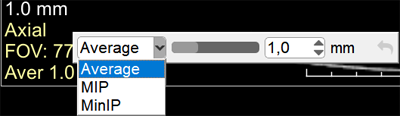
The active overlay in MPR mode contains a switch for the reconstruction method and a slider for slice thickness
Select the MPR Reconstruction Method (Average, MIP, MinIP):
Click on the active overlay of the MPR series in the lower left corner
Click on the desired reconstruction method in the list
Change Slice Thickness
Hover the mouse cursor over the slice thickness slider
Press and hold the left mouse button
Move the slider to the desired position
Release the mouse button
or
Enter the desired value in the numeric field
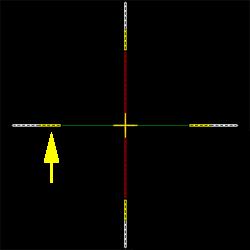
Change Slice Thickness Using 3D Lines
Hover the mouse cursor over a yellow-colored segment of the 3D line until the cursor changes to a double arrow
Press and hold the left mouse button, move the mouse
Release the left mouse button
To quickly undo changes to the representation and reconstruction thickness, click the button at the right end of the reconstruction modes panel, next to the slice thickness number
 button at the right end of the reconstruction modes panel, next to the slice thickness number