 , and then click the "Ground Glass" button
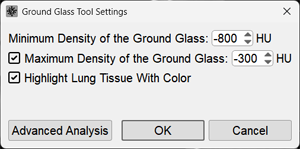
- Set the minimum threshold value in the range from -700 to -900 HU
- If necessary, set the maximum threshold as well
- Lung tissue not involved in the process is outlined in green by default
If there is a need to fill it with a solid color - click the checkbox next to the "Highlight lung tissue with color" item - The value of -1000 HU is taken as air, i.e., the larger the number in the minimum threshold, the more "sensitive" ground glass will be included in the calculation
- Click the OK button
If you need to switch to advanced analysis - left-click the "Advanced analysis" button
In the resulting series:
- unchanged lung parenchyma is outlined or colored green
- areas of the "ground-glass" type are colored red
- unaccounted consolidation areas and pleural effusion will remain gray
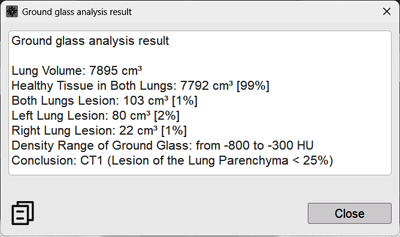

 in the lower right corner of the document thumbnail in the Preview Bar