Left-click the button in the toolbar button group "Density".
Button
Function
Mouse
Constructing a density-based volume
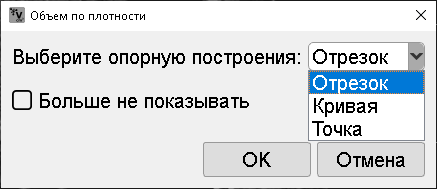
In the window that appears, select the reference for constructing the volume.
When using the same reference, click the checkbox next to "Do not show again". This window will no longer appear.
Constructing a line segment and curve is similar to constructing the same measurements in the program.
When selecting a point as a reference, position the mouse cursor at the center of the region of interest, press and hold the left mouse button
Then release the button.
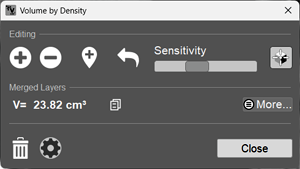
Editing the volume:
- Increases the volume region.
- Decreases the volume region.
- Adds a region to the volume.
- Sequentially undoes the last action.
The slider allows setting sensitivity. The higher the sensitivity, the greater the capture of adjacent densities.
- Hides/shows the 3D cursor and 3D lines.
- Located next to the volume calculation result and allows copying it to the clipboard.
Clicking the "More" button expands and collapses additional calculation results (mainly density characteristics).
- Deletes the volume.
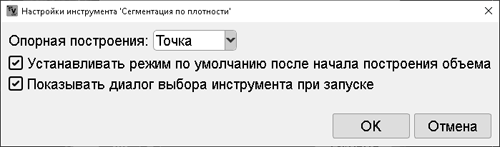
- Displays the settings window:
Allows selecting the reference type, centering in the region of interest, and showing the reference selection dialog on launch.
Completing the density-based volume construction - click the "Close" button.
 in the toolbar button group "Density".

 - Displays the settings window:

 - Increases the volume region.
 - Decreases the volume region.
 - Adds a region to the volume.
 - Sequentially undoes the last action.
 - Hides/shows the 3D cursor and 3D lines.
 - Located next to the volume calculation result and allows copying it to the clipboard.
 - Deletes the volume.