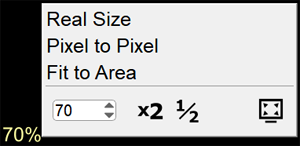
The current scale of the image on the screen relative to the size of the real object is displayed in the Active Overlay
The value in percent % is located in the lower right or left corner of the image
When the value is 100%, the size of the object's image on the screen corresponds to the actual size of the object
To change the scale, left-click on the active scale overlay and select the desired image size
Real Size - display the image on the screen at its actual size, as if we received a film from an analog device
Part of the image may not fit on the screen
Pixel for Pixel - display the image in the optimal mode for the monitor, where one pixel of the image is displayed in one monitor pixel
Part of the image may not fit on the screen
Fit to Area - show the entire image, fitting it into the current screen area
Scale - set the desired scale percentage % using the arrows
Attention!
Displaying an image at actual size and percentage scale relative to actual size is available on Windows 8.1 OS and later
On Windows 7 and Windows XP OS, the actual size display function is not available
The scale value is conditional and calculated relative to the monitor resolution
The image size corresponds to the object size only on CT/MR images
On radiographs, measurement inaccuracies are possible