Merging series is primarily used for spinal studies
Performing an MRI study of the entire spine at once is problematic from a technical standpoint
Therefore, its sections (cervical, thoracic, lumbar) are examined in different sequences
This application allows merging all sections to obtain a complete picture of the entire spine by "stitching" images of the sections, based on the table position coordinate system
Automatic Series Merging
In the application menu, sequentially click on Studies - Merge Series,
or
click the button in the Toolbar, then on button
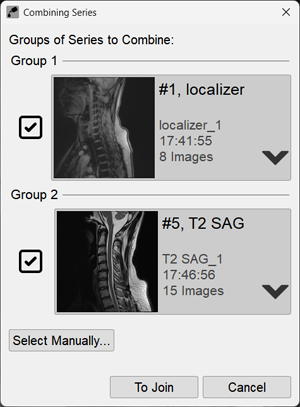
A series selection window will appear
Clicking the Down button on a series group image shows the series included in it
Series are automatically selected according to the chosen sequence
Series from different sequences cannot be merged!
Clicking the checkbox (uncheck) excludes a series group from merging
Click the To Join button
Manual Series Merging
Repeat all steps until the series selection window appears
Click the Select manually button
A series selection window will appear
By clicking the checkboxes (check) specify the series to merge
Series from different sequences cannot be merged!
Click the To Join button
Merging Result
The resulting series (several series merged into groups) will be located at the bottom of the Preview Bar with the name Composed
 in the Toolbar, then on
  button
 (uncheck) excludes a series group from merging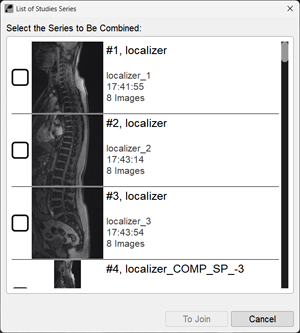
 (check) specify the series to merge